Expand description
Bindings for accessing the lighting part of the GPU pipeline
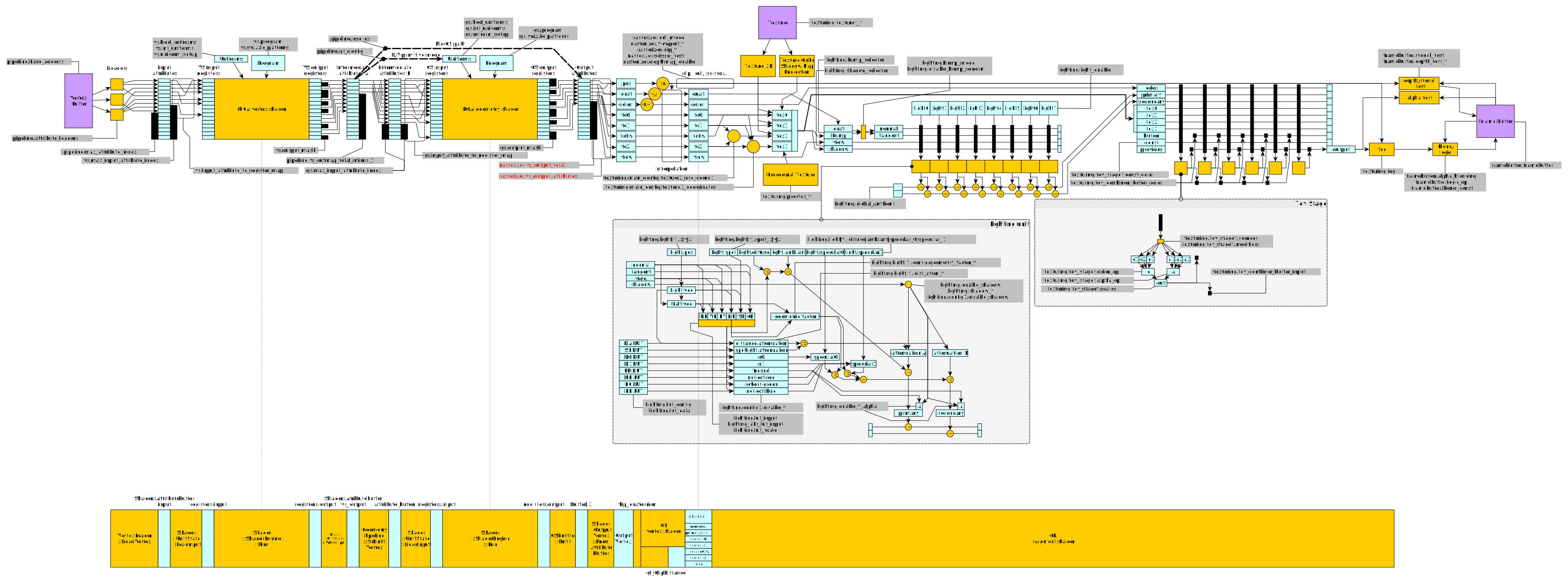
The hardware at play is shown in this diagram, you should probably have it open as a reference for the documentation in this module.
§Hardware lights
There are 8 lights in the GPU’s pipeline each of which have 4 colour fields and 1 spotlight colour,
you can set all of them at once with LightEnv::set_material. When rendering for example you call
set_material in your preparation code before the actual draw call.
For things like specular lighting we need to go a bit deeper
§LUTS
LUTS are lookup tables, in this case for the GPU. They are created ahead of time and stored in Lut’s,
Lut::from_fn essentially memoises the given function with the input changing depending on what
input it is bound to when setting it on the LightEnv.
§Example
Lets say we have this code
let mut inst = Instance::new();
let mut env = inst.light_env_mut();
env.as_mut().connect_lut(
    LutInputId::D0,
    LutInput::NormalView,
    Lut::from_fn(|x| x.powf(10.0)),
);
This places the LUT in D0 (refer to the diagram) and connects the input wire as the dot product
of the normal and view vectors. x is effectively the dot product of the normal and view for every vertex and
the return of the closure goes out on the corresponding wire
(which in the case of D0 is used for specular lighting after being combined with with specular0)
Structs§
- Distance
Attenuation - Lookup-table (plus some additional information) to handle distance attenuation of a light source.
- Light
- Light source, used by a
LightEnv. - Light
Env - Lighting environment, passed as one of the fragment stages.
- Light
Index - Index for one of the 8 hardware lights in the lighting environment.
- Lut
- Lookup-table for light data.
- Material
- Lighting and surface material used by the fragment stage.
- Spotlight
- Lookup-table to handle the spotlight area of a light source.
Enums§
- Bump
Mapping Mode - Bump map modes.
- Fresnel
Selector - LutId
- Identifier/index for the various LUTs associated to a
LightEnv. - LutInput
- This is used to decide what the input should be to a
Lut - LutScale
- LUT scaling factors.